Build the counterparty form
Ask Talentir which fields a counterparty needs, and show them as a form with one screen for each section.
The details that Talentir needs depend on the counterparty's type, country, and payment method, and on your team's tax settings. There is no fixed form. POST /counterparties/requirements tells you which fields to show. Build your form from its answer.
This guide builds the form as four screens: identity, address, payment details, and tax details.
How it works
- The answer. The endpoint returns
fieldsandchoicesfor the selections so far. The first request is{}. - The key. The
keyof a field, such asaddress.city, is its path in the body ofPOST /counterparties. The part before the dot is the section, and thus the screen. Do not show a screen that has no fields. - Selections. A field with
refreshOnChange: truechanges the form. When the user changes it, send the request again with all selections so far. The new answer replaces the last one. - Next. Each answer has the known fields of all four screens. When the user clicks Next, send no request. Show the next screen from the last answer.
- Back. When the user goes back and changes a selection, send the request again. Keep the values of the fields that are still in the answer. Drop the other values.
- The request. It takes only the selections:
identity.type,address.country,paymentMethod.type,paymentMethod.asset,taxIdentity.taxClassification, andtaxIdentity.vatExempt. Any other key gives 400VALIDATION_FAILED. - Tax settings. If your team collects DAC7 data, an EU counterparty gets more tax fields. If it collects W-9 data, a US counterparty does. The endpoint knows these settings. Do not send them.
- Email.
emailhas no section, and it is optional. Put it on the screen where it fits best.
Do not hardcode fields, and do not keep a copy of an answer. The rules change without a new API version.
Show a field
Show the fields of a screen in the order of the answer. Keep the order of options too.
type: show a select forselect, a date picker fordate(sendYYYY-MM-DD), an email input foremail, and a text input fortext. Show an unknown type as a text input.label,example,description,required: the label, the placeholder, the help text, and the required mark. Aselecthasoptions, each with avalueto send, alabel, and adescription.choice: the field is part of a choice inchoices. Show the choice one time, with a radio button for each option. Show the inputs of the selected option only. A field of typedeclarationhas no input: its value istruewhen the user picks its option.pattern,minLength,maxLength: check the value while the user types. First applynormalizeto a copy of the value.uppercaseremoves the whitespace at both ends and uppercases.uppercase_no_whitespaceuppercases and removes all whitespace. Send the value as the user typed it.localName,format: for a tax id, the name in the country and the format in words. Show them as a hint.
Let the user continue when each required field has a value and each choice has a complete selected option.
The server checks more than pattern. POST /counterparties returns 400 VALIDATION_FAILED with the path of each failing field. Show the message next to that field.
The labels are in English. To translate them, use key, the option value, and the choice id.
The example
The example is a person in Germany, paid by SEPA, who is not registered for VAT. The team does not collect DAC7 data.
The responses are shortened. … replaces properties or the end of a long string. A // … comment replaces fields or options. // new marks a field that the answer before did not have.
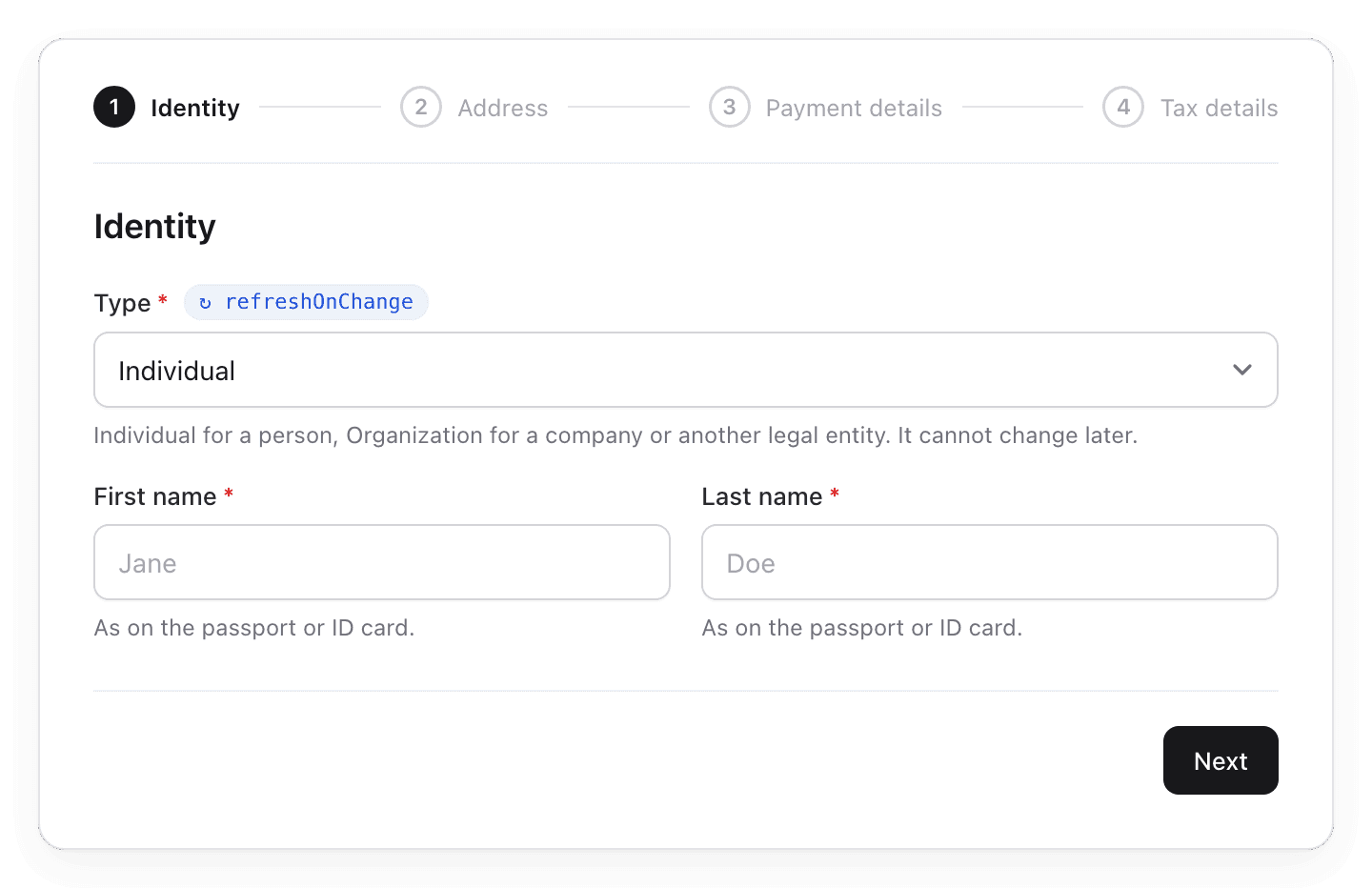
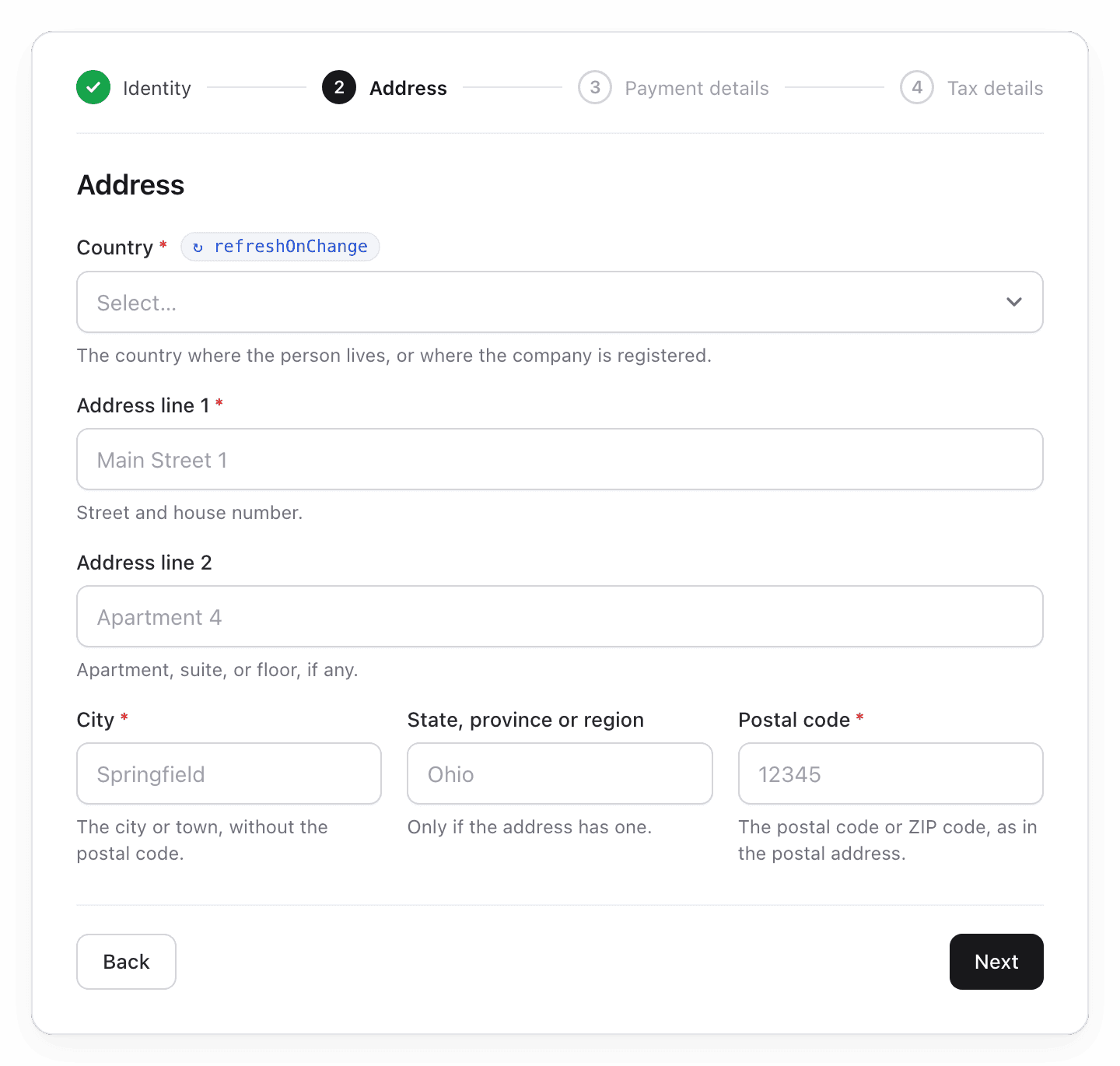
In the pictures, a red * marks a required field, and a badge marks a field with refreshOnChange: true.
Screen 1: Identity
Step 1: The form opens
Send an empty body:
curl -X POST "$BASE_URL/counterparties/requirements" \
  -H "Authorization: Bearer $TALENTIR_API_KEY" \
  -H "Content-Type: application/json" \
  -d '{}'
The answer has the fields that every counterparty needs, for all screens:
{
  "object": "counterparty_requirements",
  "fields": [
    {
      "key": "identity.type",
      "label": "Type",
      "type": "select",
      "required": true,
      "choice": null,
      "localName": null,
      "format": null,
      "description": "Individual for a person, Organization for a company or another legal entity. It cannot change later.",
      "pattern": null,
      "normalize": null,
      "minLength": null,
      "maxLength": null,
      "example": null,
      "options": [
        { "value": "individual", "label": "Individual", "description": null },
        { "value": "organization", "label": "Organization", "description": null }
      ],
      "refreshOnChange": true
    },
    { "key": "email", "label": "Email", "type": "email", "required": false, … },
    { "key": "address.country", "label": "Country", "type": "select", "required": true, …, "refreshOnChange": true },
    { "key": "address.line1", "label": "Address line 1", "type": "text", "required": true, … },
    { "key": "address.line2", "label": "Address line 2", "type": "text", "required": false, … },
    { "key": "address.city", "label": "City", "type": "text", "required": true, … },
    { "key": "address.state", "label": "State, province or region", "type": "text", "required": false, … },
    { "key": "address.postalCode", "label": "Postal code", "type": "text", "required": true, … },
    { "key": "paymentMethod.type", "label": "Payment method", "type": "select", "required": true, …, "refreshOnChange": true }
  ],
  "choices": []
}
Show the fields whose key starts with identity.:
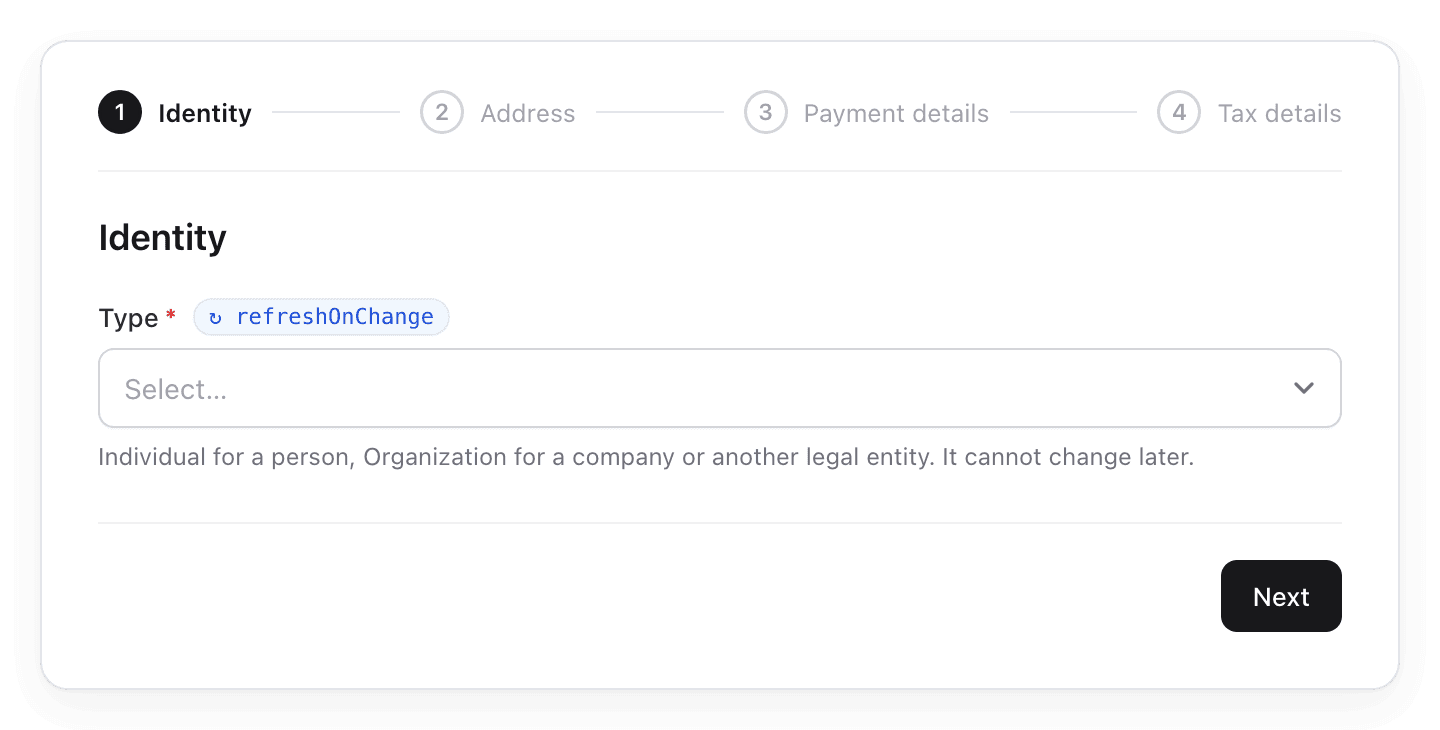
Step 2: The user picks Individual
The type has refreshOnChange: true. Send the request again with the type:
{ "identity": { "type": "individual" } }The answer adds the first name and the last name:
{
  "object": "counterparty_requirements",
  "fields": [
    { "key": "identity.type", "label": "Type", "type": "select", "required": true, …, "refreshOnChange": true },
    { "key": "identity.firstName", "label": "First name", "type": "text", "required": true, … }, // new
    { "key": "identity.lastName", "label": "Last name", "type": "text", "required": true, … }, // new
    // … email, the address fields, and paymentMethod.type, as in step 1
  ],
  "choices": []
}
For an organization, the answer adds one name field instead, identity.name.
Screen 2: Address
Step 3: The user clicks Next
Send no request. The answer of step 2 already has the address fields:
{
  "object": "counterparty_requirements",
  "fields": [
    // … the other fields
    { "key": "address.country", "label": "Country", "type": "select", "required": true, …, "refreshOnChange": true },
    { "key": "address.line1", "label": "Address line 1", "type": "text", "required": true, … },
    { "key": "address.line2", "label": "Address line 2", "type": "text", "required": false, … },
    { "key": "address.city", "label": "City", "type": "text", "required": true, … },
    { "key": "address.state", "label": "State, province or region", "type": "text", "required": false, … },
    { "key": "address.postalCode", "label": "Postal code", "type": "text", "required": true, … },
    // … the other fields
  ],
  "choices": []
}
Step 4: The user picks Germany
The country has refreshOnChange: true. Send the request again with the type and the country:
{
  "identity": { "type": "individual" },
  "address": { "country": "DE" }
}
The answer adds the tax fields for a person in Germany:
{
  "object": "counterparty_requirements",
  "fields": [
    // … the 11 fields of step 2
    { "key": "taxIdentity.vatNumber", "label": "VAT number", "type": "text", "required": false, … }, // new
    { "key": "taxIdentity.vatExempt", "label": "Not registered for VAT", "type": "declaration", "required": false, …, "refreshOnChange": true } // new
  ],
  "choices": [
    { "id": "vat_status", "label": "VAT status", … } // new
  ]
}
The address screen keeps its fields:
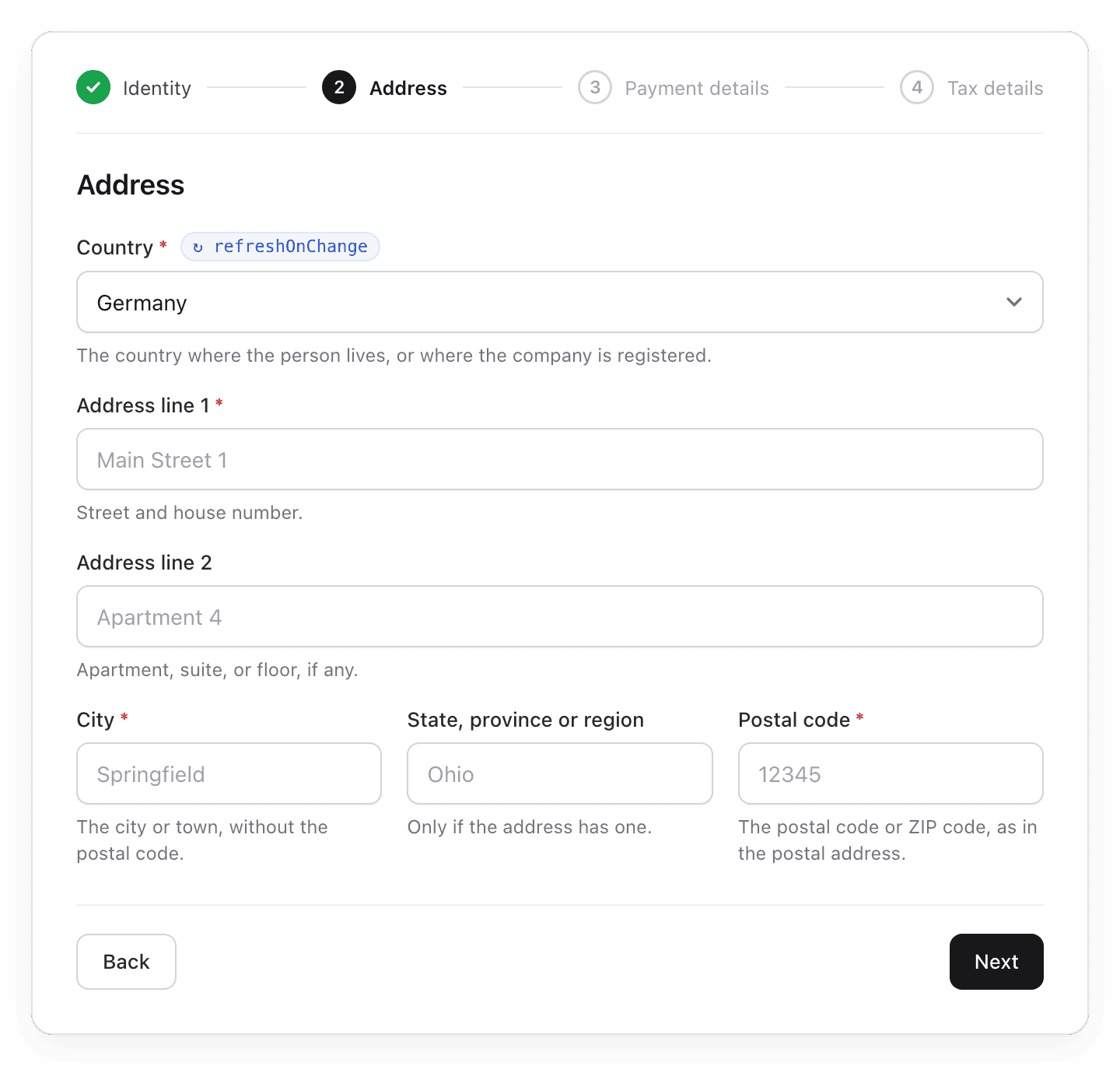
The next screens change. The options of paymentMethod.type are now in the order for Germany.
Screen 3: Payment details
Step 5: The user clicks Next
Send no request. Show the payment field from the answer of step 4:
{
  "object": "counterparty_requirements",
  "fields": [
    // … the other fields
    {
      "key": "paymentMethod.type",
      "label": "Payment method",
      "type": "select",
      "required": true,
      "choice": null,
      "localName": null,
      "format": null,
      "description": "How the money is sent: by bank transfer, by PayPal or Venmo, or to a crypto wallet.",
      "pattern": null,
      "normalize": null,
      "minLength": null,
      "maxLength": null,
      "example": null,
      "options": [
        { "value": "sepa", "label": "SEPA", "description": "A transfer in euro to an IBAN in the SEPA zone." },
        { "value": "paypal", "label": "PayPal", "description": "A payment to a PayPal account, by its email address." },
        // … 10 more
      ],
      "refreshOnChange": true
    },
    // … the other fields
  ],
  "choices": [ … ]
}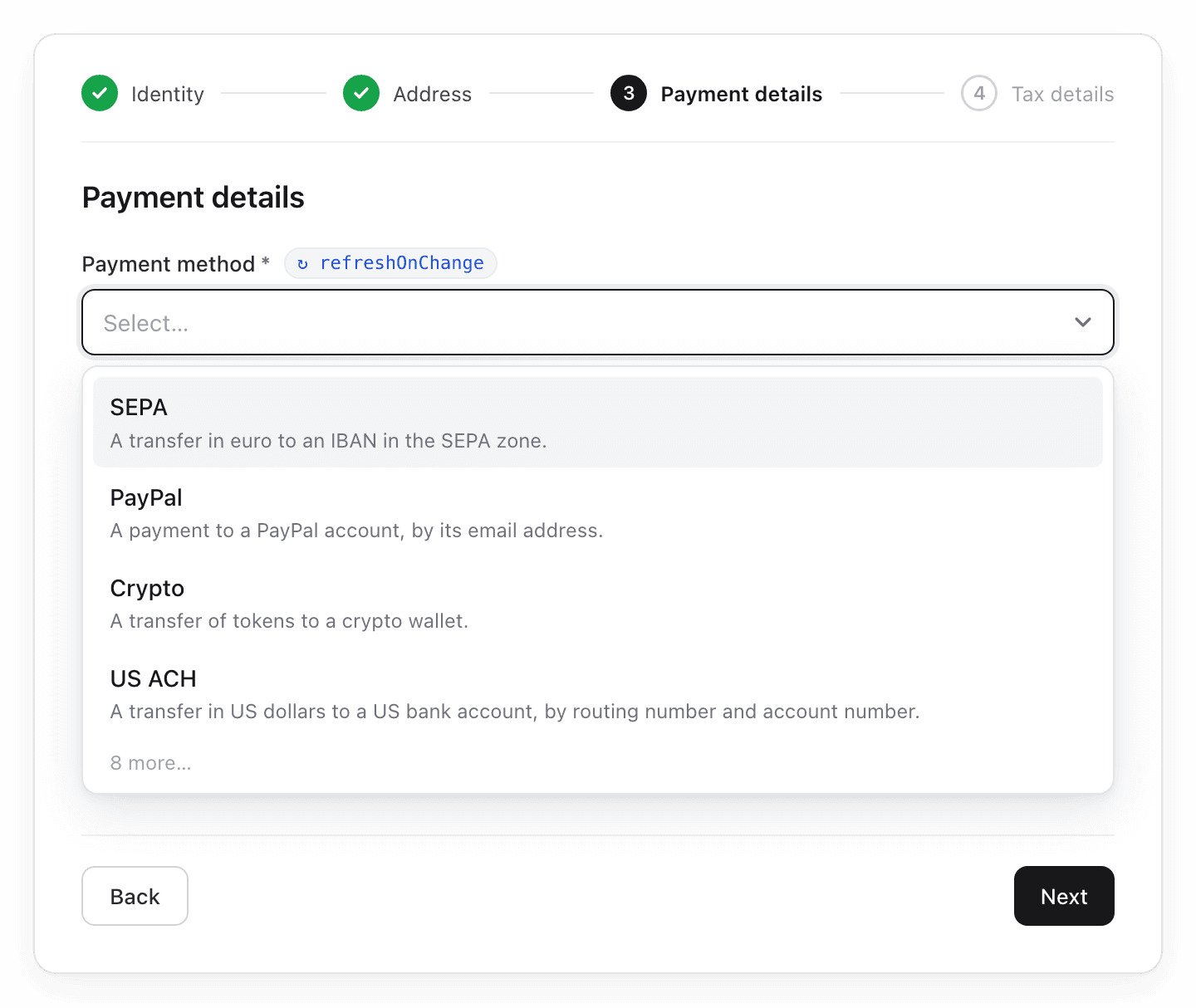
The payment methods that people in Germany use most come first. Show the description of each option as help.
Step 6: The user picks SEPA
The payment method has refreshOnChange: true. Send the request again with all three selections:
{
  "identity": { "type": "individual" },
  "address": { "country": "DE" },
  "paymentMethod": { "type": "sepa" }
}
The answer adds the currency and the IBAN:
{
  "object": "counterparty_requirements",
  "fields": [
    // … the identity fields, email, and the address fields
    { "key": "paymentMethod.type", "label": "Payment method", "type": "select", "required": true, …, "refreshOnChange": true },
    {
      "key": "paymentMethod.currency",
      "label": "Currency",
      "type": "select",
      "required": true,
      "choice": null,
      "localName": null,
      "format": null,
      "description": "The currency the money arrives in.",
      "pattern": null,
      "normalize": null,
      "minLength": null,
      "maxLength": null,
      "example": null,
      "options": [
        { "value": "EUR", "label": "Euro", "description": null }
      ],
      "refreshOnChange": false
    }, // new
    {
      "key": "paymentMethod.iban",
      "label": "IBAN",
      "type": "text",
      "required": true,
      "choice": null,
      "localName": null,
      "format": null,
      "description": "The IBAN of the bank account. It is on a bank statement or in online banking. SEPA does not pay to every …",
      "pattern": "^(?=AD|AL|AT|BE|BG|CH|CY|CZ|DE|DK|EE|ES|FI|FR|GB|GI|GR|HR|HU …",
      "normalize": "uppercase_no_whitespace",
      "minLength": null,
      "maxLength": null,
      "example": "DE89370400440532013000",
      "options": null,
      "refreshOnChange": false
    }, // new
    // … the two VAT fields
  ],
  "choices": [
    { "id": "vat_status", "label": "VAT status", … }
  ]
}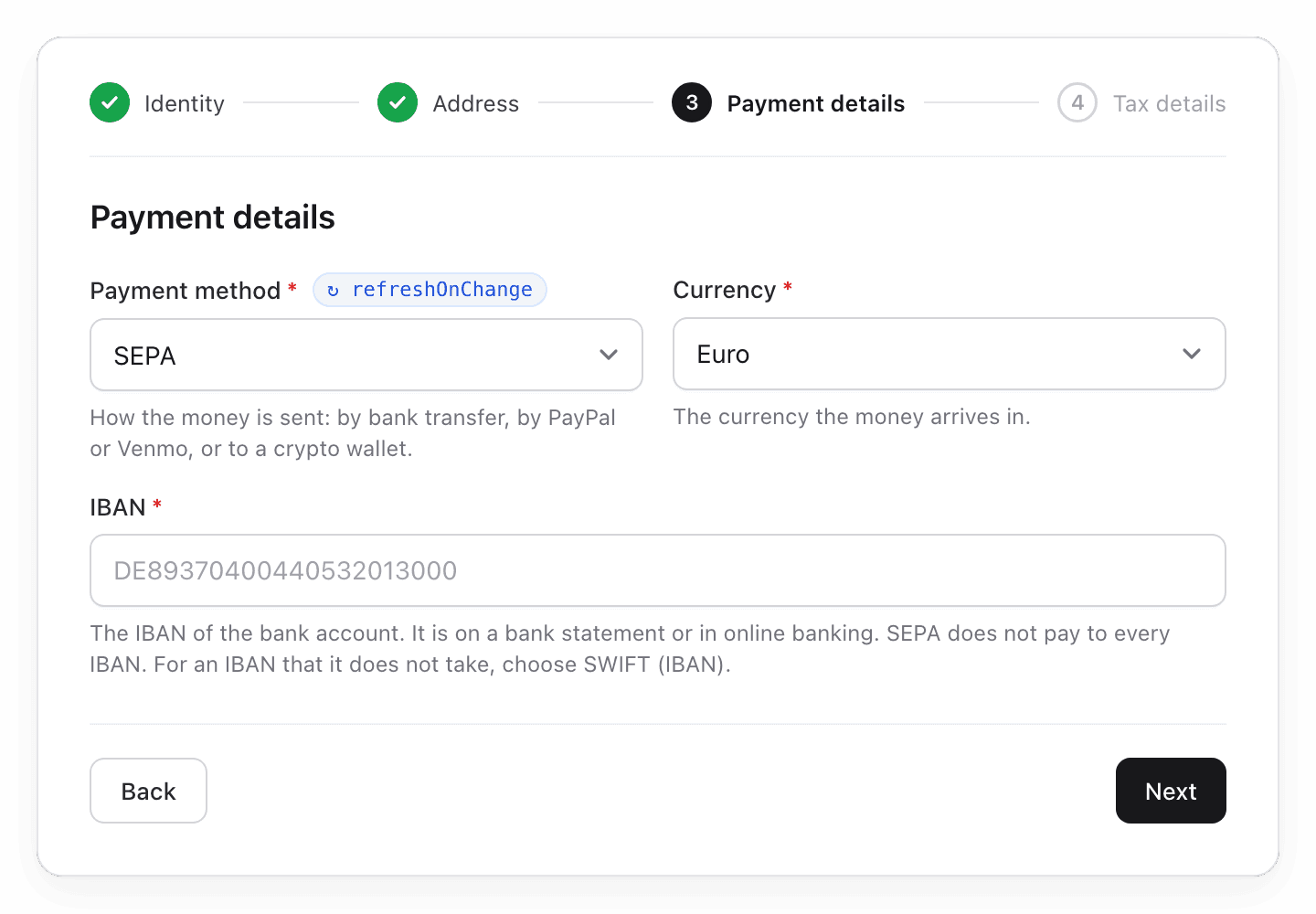
The currency has only one option. The create body needs it, so select it for the user.
The IBAN has normalize: "uppercase_no_whitespace". The user can type it in lowercase and with spaces.
For a crypto wallet, the token, paymentMethod.asset, also has refreshOnChange: true. It decides the format of the wallet address.
Screen 4: Tax details
Step 7: The user clicks Next
Send no request. Show the tax fields from the answer of step 6. They came with step 4:
{
  "object": "counterparty_requirements",
  "fields": [
    // … the other fields
    { "key": "taxIdentity.vatNumber", "label": "VAT number", "type": "text", "required": false, … },
    {
      "key": "taxIdentity.vatExempt",
      "label": "Not registered for VAT",
      "type": "declaration",
      "required": false,
      "choice": "vat_status",
      "localName": null,
      "format": null,
      "description": "Choose this when the person or company has no VAT registration.",
      "pattern": null,
      "normalize": null,
      "minLength": null,
      "maxLength": null,
      "example": null,
      "options": null,
      "refreshOnChange": true
    }
  ],
  "choices": [
    {
      "id": "vat_status",
      "label": "VAT status",
      "options": [
        { "label": "Registered for VAT", "keys": ["taxIdentity.vatNumber"] },
        { "label": "Not registered for VAT", "keys": ["taxIdentity.vatExempt"] }
      ]
    }
  ]
}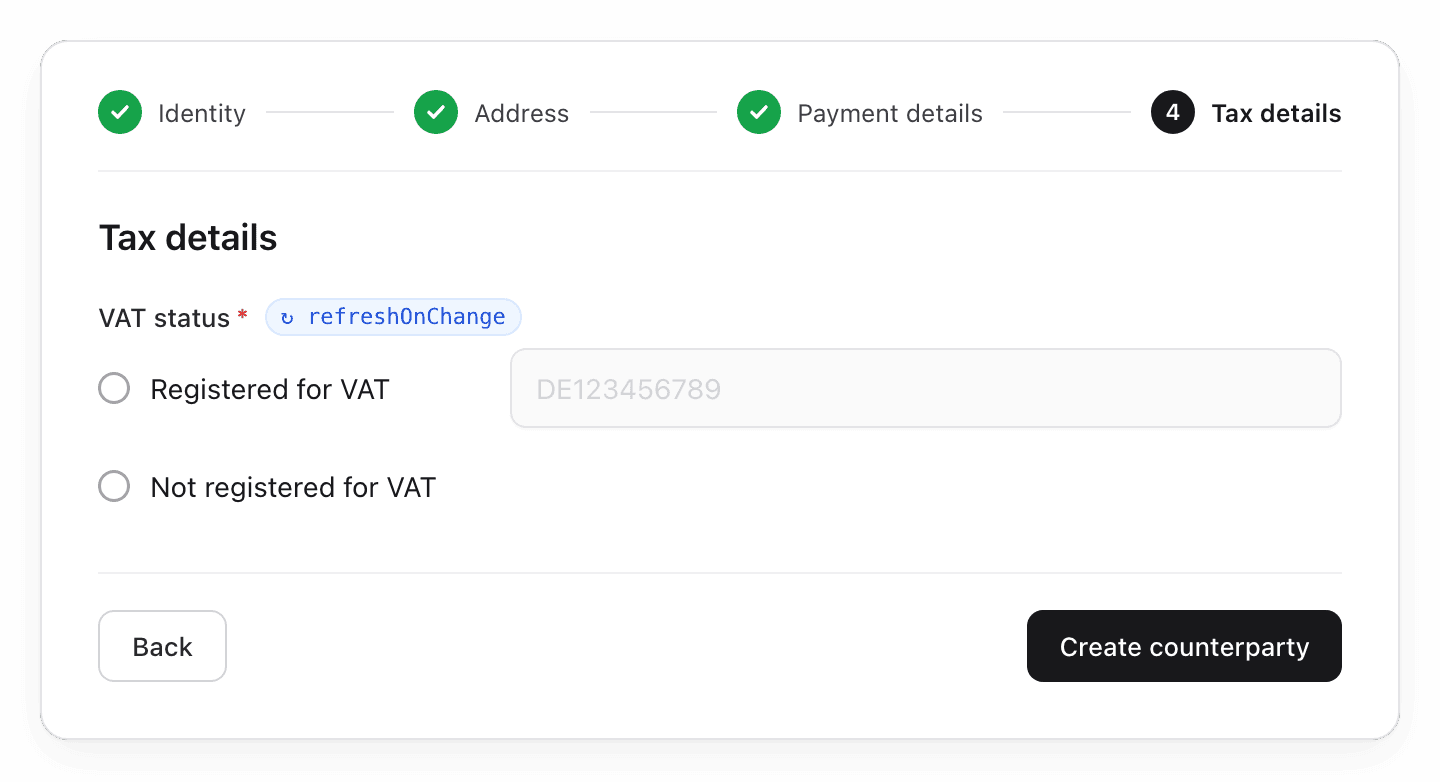
Both fields have choice: "vat_status". Show them as one choice with two radio buttons:
- Registered for VAT needs
taxIdentity.vatNumber. Show its input with the radio button. - Not registered for VAT needs
taxIdentity.vatExempt, adeclaration. It has no input.
Step 8: The user picks Not registered for VAT
The declaration has refreshOnChange: true. Send the request again with "vatExempt": true:
{
  "identity": { "type": "individual" },
  "address": { "country": "DE" },
  "paymentMethod": { "type": "sepa" },
  "taxIdentity": { "vatExempt": true }
}
The answer adds the tax id, and it is required:
{
  "object": "counterparty_requirements",
  "fields": [
    // … the 15 fields of step 6
    {
      "key": "taxIdentity.taxId",
      "label": "Tax identification number",
      "type": "text",
      "required": true,
      "choice": null,
      "localName": "Steuernummer",
      "format": "10 to 13 digits, e.g. 123/456/78901",
      "description": "The Steuernummer is for invoices and tax reporting. It is different from the personal Steuer-ID. The …",
      "pattern": "^(?:\\d{10,13}|\\d{2,3}\\/\\d{3,4}\\/\\d{4,5})$",
      "normalize": "uppercase_no_whitespace",
      "minLength": 1,
      "maxLength": 50,
      "example": "123/456/78901",
      "options": null,
      "refreshOnChange": false
    } // new
  ],
  "choices": [
    { "id": "vat_status", "label": "VAT status", … }
  ]
}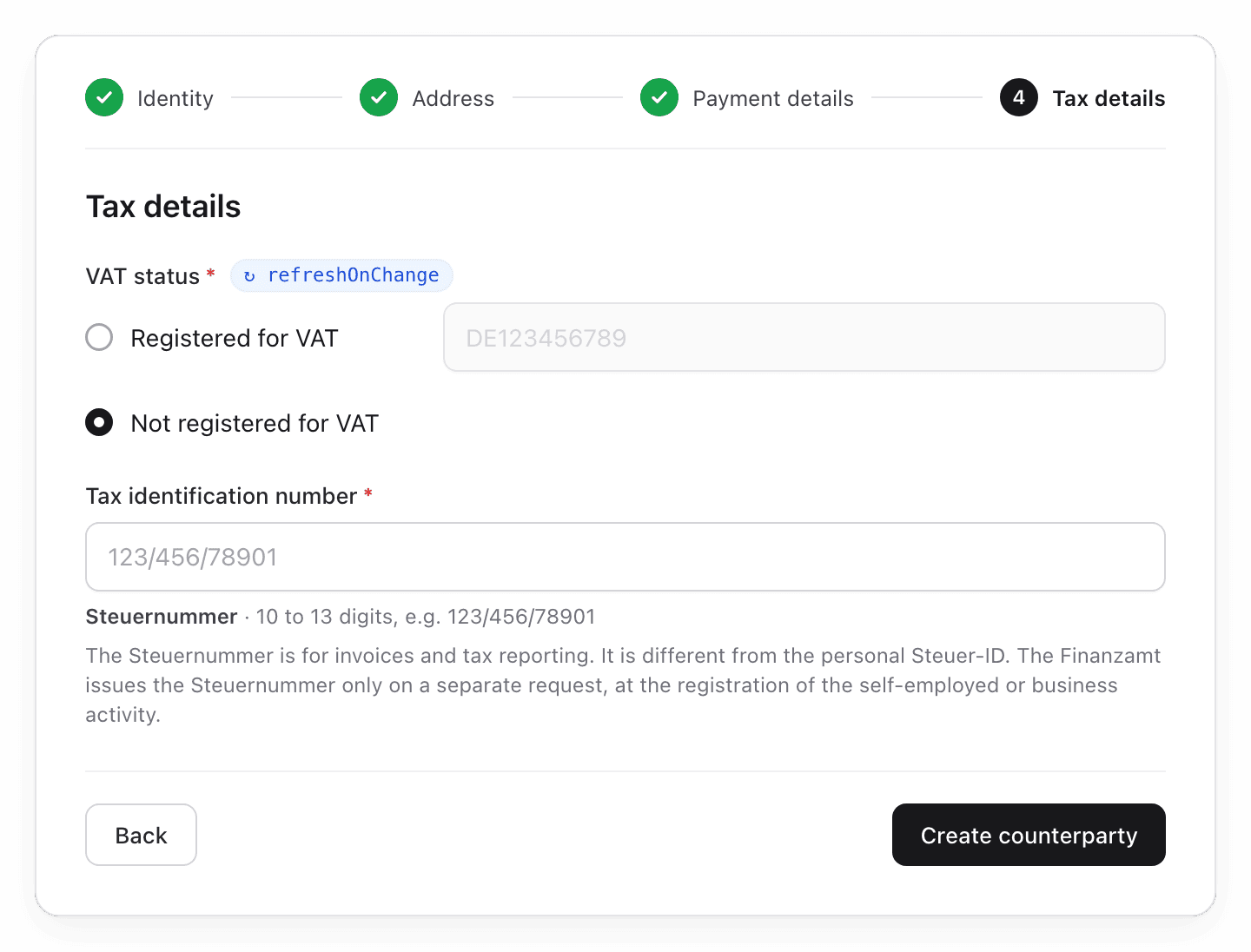
If the user goes back to Registered for VAT, send the request again without vatExempt. The answer then has no tax id: drop its value.
Send only the fields of the selected option. Do not send "vatExempt": false. It is deprecated, and means the same as leaving it out.
Other teams and countries:
- If the team collects DAC7 data, a person in Germany always gives the tax id and the date of birth. The declaration then has
refreshOnChange: false, and this step needs no request. - The US tax classification also has
refreshOnChange: true. For a single-member LLC, the answer adds the owner's name.
Step 9: The user clicks Create counterparty
Put each value at its key. This is the body of POST /counterparties:
curl -X POST "$BASE_URL/counterparties" \
  -H "Authorization: Bearer $TALENTIR_API_KEY" \
  -H "Idempotency-Key: $(uuidgen)" \
  -H "Content-Type: application/json" \
  -d '{
    "identity": { "type": "individual", "firstName": "Jane", "lastName": "Doe" },
    "address": { "line1": "Hauptstraße 1", "city": "Berlin", "postalCode": "10115", "country": "DE" },
    "paymentMethod": { "type": "sepa", "currency": "EUR", "iban": "DE89 3704 0044 0532 0130 00" },
    "taxIdentity": { "vatExempt": true, "taxId": "123/456/78901" }
  }'
An empty missing in the response means that you can pay the counterparty. Continue with Pay directly.
required tells you what a payment needs. The create needs only identity and address. You can add paymentMethod and taxIdentity later with PATCH. Until then, missing names them. A section that you send must be complete. Only the VAT status can wait.
Build an edit form
Build the screens in the same way:
- Send the request with the saved selections of the counterparty. Send no other saved value.
- A saved selection can be out of date, for example a token that Talentir no longer pays out. The answer is then 400
VALIDATION_FAILEDwith the path of that selection. Send the request again without it, and let the user pick a new value. - Fill the fields with the saved values. Do not let the user change
identity.type: it cannot change after the create. - Send the changes with
PATCH /counterparties/{id}.PATCHreplaces each nested object as a whole. If you change one field ofaddress,paymentMethod, ortaxIdentity, send all fields of that object.